Delivery Management
Complete POS guide · Start a POS trial · Setup checklist
Delivery Management
In-house drivers, 3PD delegation (DoorDash Drive, Uber Direct), or hybrid mode. Route optimization, driver GPS tracking, auto-dispatch, and menu sync to 3PD platforms. The current settings screen separates 3PD, in-house, and hybrid choices and keeps provider setup and menu sync in the same workflow.
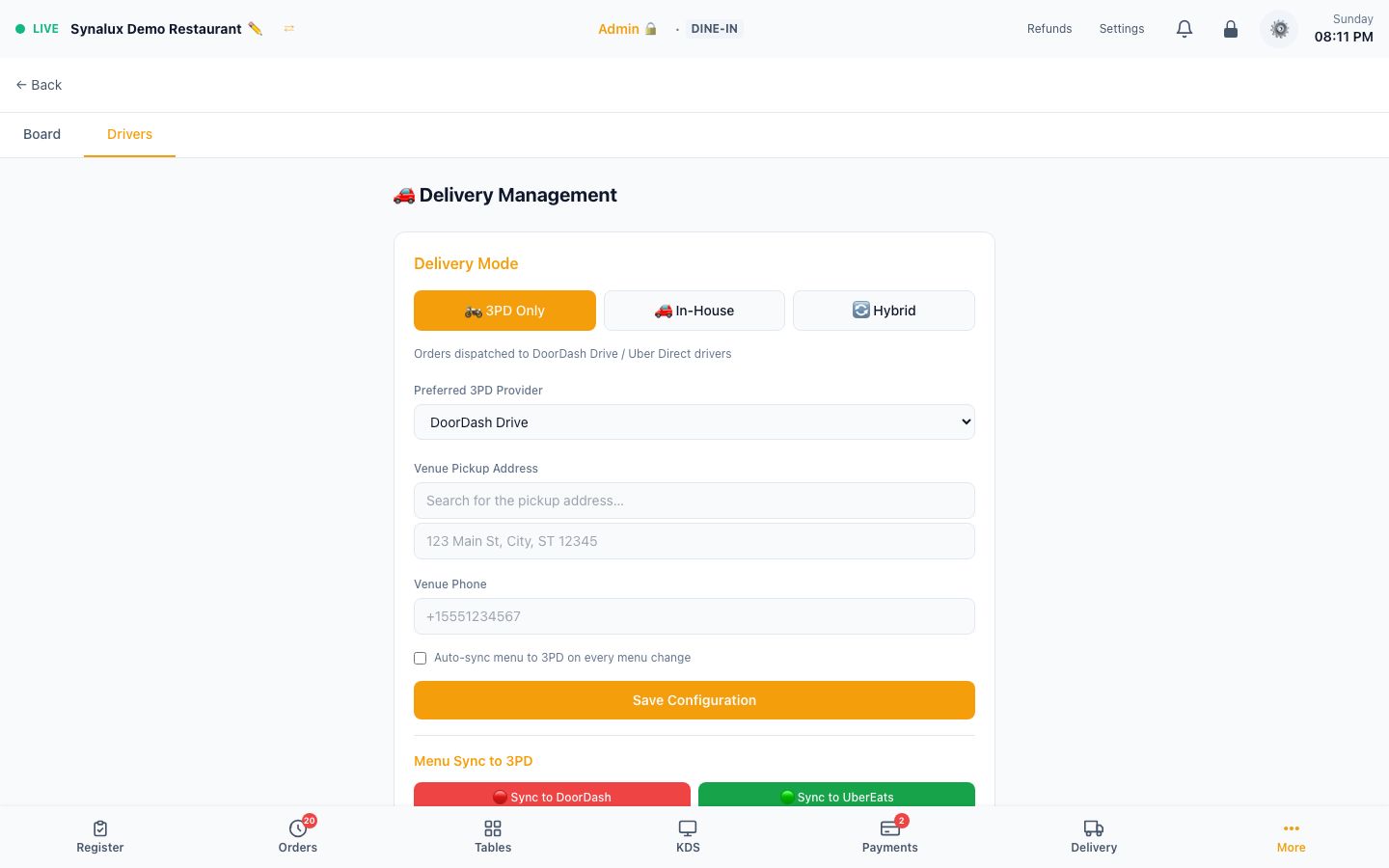
Delivery Board — /pos/delivery
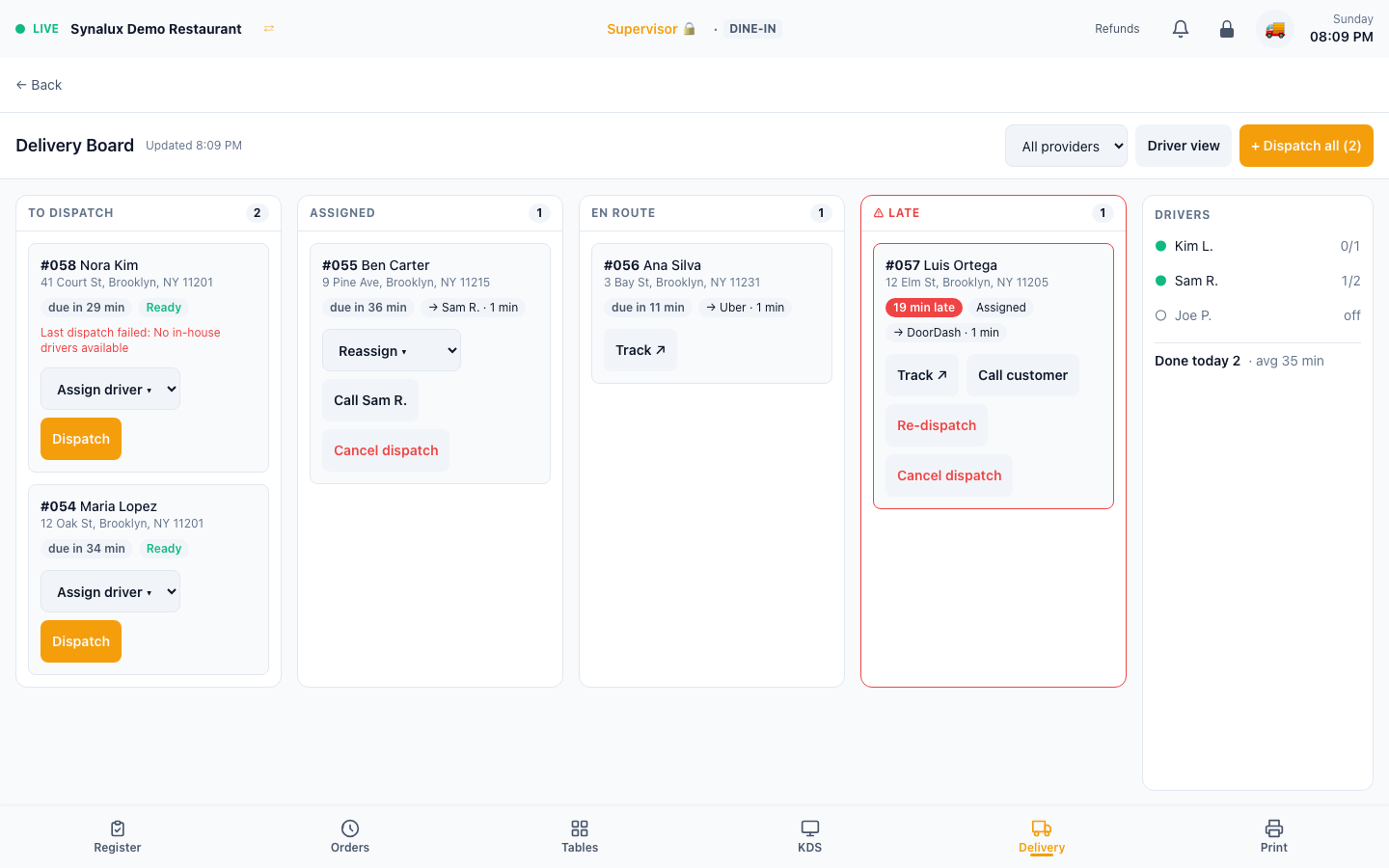
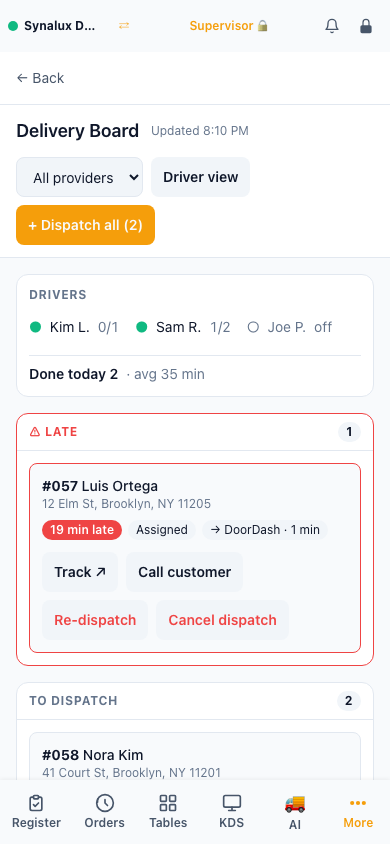
The Delivery Board is where the Delivery revenue center lands. Every delivery order that still needs someone to act sits in one column, with the action it needs on its card.
| Column | What is in it | Actions on the card |
|---|---|---|
| To dispatch | Delivery orders sent to the kitchen with no active courier, marked Ready or In kitchen. If the last dispatch failed, the card says why | Assign driver, Dispatch |
| Assigned | Orders given to an in-house driver or booked with DoorDash Drive or Uber Direct, not yet picked up | Reassign (in-house), Call the driver, Track (3PD), Cancel dispatch |
| En route | Orders picked up and on the way | Call the driver, Track (3PD) |
| Late | Anything past its promised time: the provider's estimate, the scheduled time, or 45 minutes after the order was sent to the kitchen | Call customer, Re-dispatch if not yet picked up, plus the card's usual actions |
- Drivers panel — each driver shows as online or off, with current orders against their limit. The panel also shows deliveries done today and the average delivery time.
- Assign and reassign — only online in-house drivers below their order limit can be picked. An order booked with DoorDash or Uber cannot be handed to a driver until that courier is cancelled, so one order is not sent out twice.
- Dispatch and Dispatch all use the venue's delivery mode: in-house tries to assign an online driver, 3PD books a courier with the preferred provider, and hybrid tries in-house first. Dispatch all asks for confirmation first, because a 3PD booking may charge a fee.
- Cancel dispatch and Re-dispatch ask for confirmation. A cancelled or failed order returns to To dispatch.
- All providers filters the board to in-house, DoorDash, or Uber deliveries. The board refreshes every 15 seconds.
- Where to find it — for staff who can open the board, the bottom bar shows a Delivery tab once the venue runs deliveries: the Delivery revenue center is selected, a delivery mode is set, or online ordering offers delivery. Staff who can open both switch between the board and Settings > Delivery with the Board | Drivers tabs.
- Who can use it — supervisors and managers by default. The board lists customer names, phone numbers, and addresses, so it is not granted to servers or drivers; drivers use the driver page below.
Setup
- Choose mode in Settings > Delivery: 3PD Only, In-House, or Hybrid (try in-house first, fall back to 3PD)
- 3PD providers — connect DoorDash Drive or Uber Direct in Settings > Integrations, then test delivery creation, status updates, and cancellation
- In-house drivers — add drivers with name, phone, vehicle type (car/bike/scooter/walk), and max concurrent orders
- Menu sync — tap "Sync to DoorDash" / "Sync to Uber Eats" to upload your menu. Enable auto-sync to push changes automatically when you edit menu items
- Driver mobile page — drivers open
/pos/delivery/driveron their phone. They see assigned orders, tap to navigate, mark picked up / delivered / failed, and auto-report GPS every 30s - Route optimization — batch dispatch clusters nearby deliveries and assigns the optimal driver using proximity scoring
- Order status sync — when KDS bumps an order to "ready", the system notifies the 3PD provider and triggers auto-dispatch for in-house drivers
The driver page is documented without a screenshot when the demo has no assigned deliveries; an empty driver queue is not representative of the workflow.