💳 Billing & Payments
Use the Billing workspace to review charges and recorded payments. Patients use the patient portal to review their balance and, when the practice has enabled it, open a secure Stripe payment page.
Set up the practice's Stripe account
A practice administrator opens Billing, chooses Patient payments, then Set up payments with Stripe. Review the country shown before continuing; Stripe collects the business and payout details on its own pages.
- Continue setup means Stripe still needs information. Patients should contact the practice to pay until setup is complete.
- Patients can pay online means the connected account is ready to accept payments.
- If the account is disconnected or restricted, an administrator must resolve its status before patients can pay online.
Payments are created on the practice's connected Stripe account. Manage payout settings, disputes, and refunds in that account. Stripe's processing fees follow the practice's Stripe agreement.
Tested client-billing preview
Availability: preview, not yet released to production. The workflows below were exercised in isolated local staging with synthetic client records. Card payments were tested in Stripe TEST mode. Screenshots are real application captures; example amounts are not suggested clinical fees or insurance rates.
Record insurance and review a client's billing
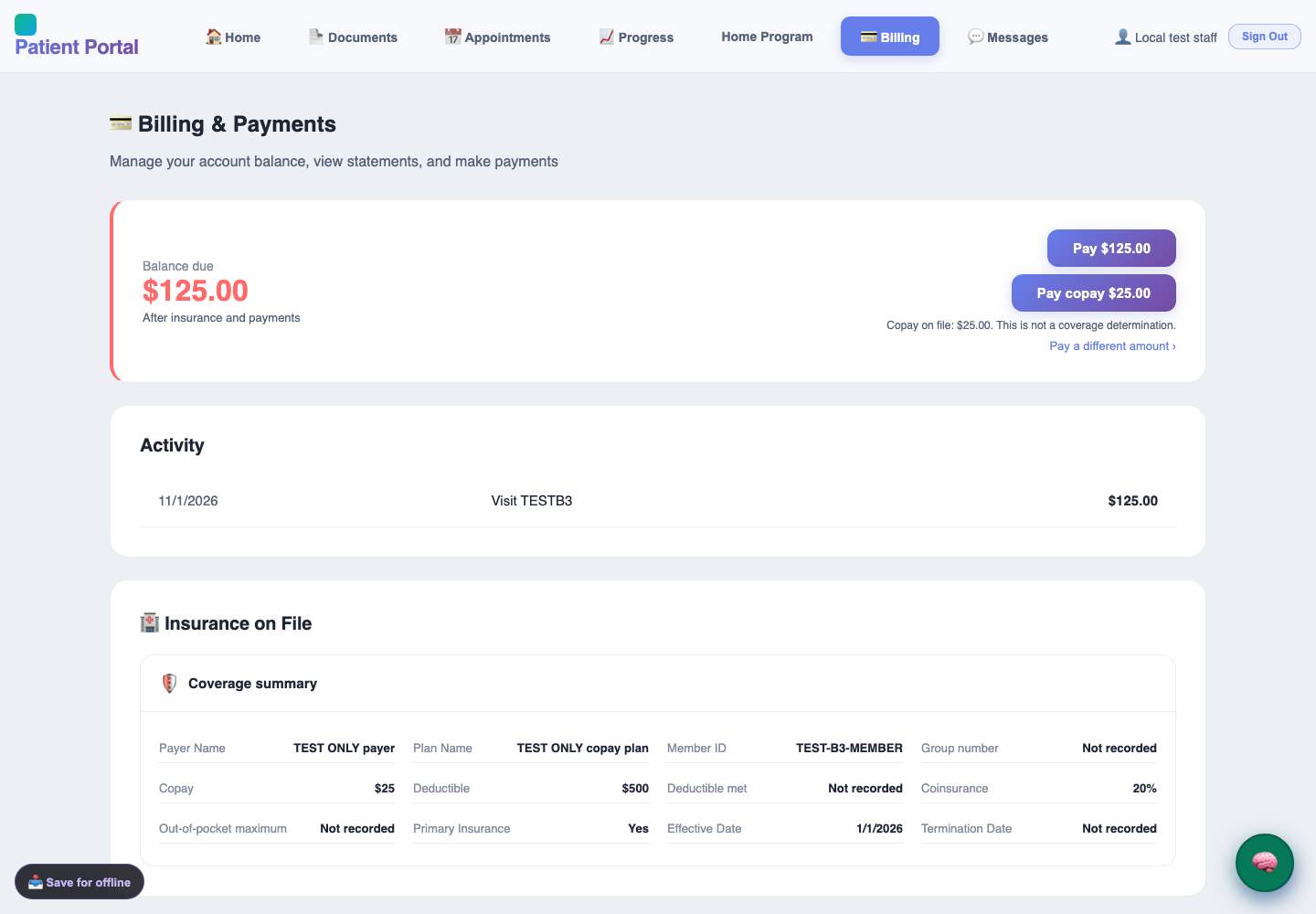
Open the client's chart and review Insurance and Billing. The saved policy supplies insurer, plan/member details, copay, deductible, and coinsurance where recorded. An unknown value stays unknown. A copay is separate from the appointment's service price and the current amount owed.
The patient's Billing tab shows the balance, dated activity, and insurance on file. Patient access follows the linked patient record; appointment-only caregiver approval does not grant billing access.
Set a service price and apply it to an appointment
- Open Billing → Billing codes to maintain the practice's service/code list.
- Record the service description, rate, billing basis, and whether it is active. The preview supports a flat fee or a rate per 15 minutes.
- Select the service when creating or editing an appointment. Review the units and estimated total before saving.
- The appointment retains its saved service and rate when the catalog price later changes. A service without a recorded rate stays unpriced.
- When completing and billing the visit, review the resulting charge. The saved appointment price supplies the charge; a service estimate does not determine what insurance will cover.
The preview also verified that completing the same visit again does not add a duplicate charge. See Scheduling & Appointments for the existing scheduling workflow.
Let a patient choose a payment amount
In the patient's Billing tab:
| Choice | Amount collected |
|---|---|
| Pay | The full balance currently available to pay. |
| Pay copay | The eligible recorded copay, capped at the available balance. |
| Pay a different amount → Pay Now | A positive custom amount up to the available balance. |
These choices pay an existing billed balance; they do not collect prepayments for a future visit. Card details are entered on Stripe's hosted page.
An in-progress payment reserves that amount so it is not offered for payment again. An unpaid cancellation releases the reservation only after its outcome is confirmed. After a successful payment, the recorded credit reduces the balance.
Review the outcome
The tested example started with $125 due:
| Patient action | Balance afterward |
|---|---|
| Pay the $25 copay | $100.00 |
| Cancel a $40.50 payment without paying | $100.00 |
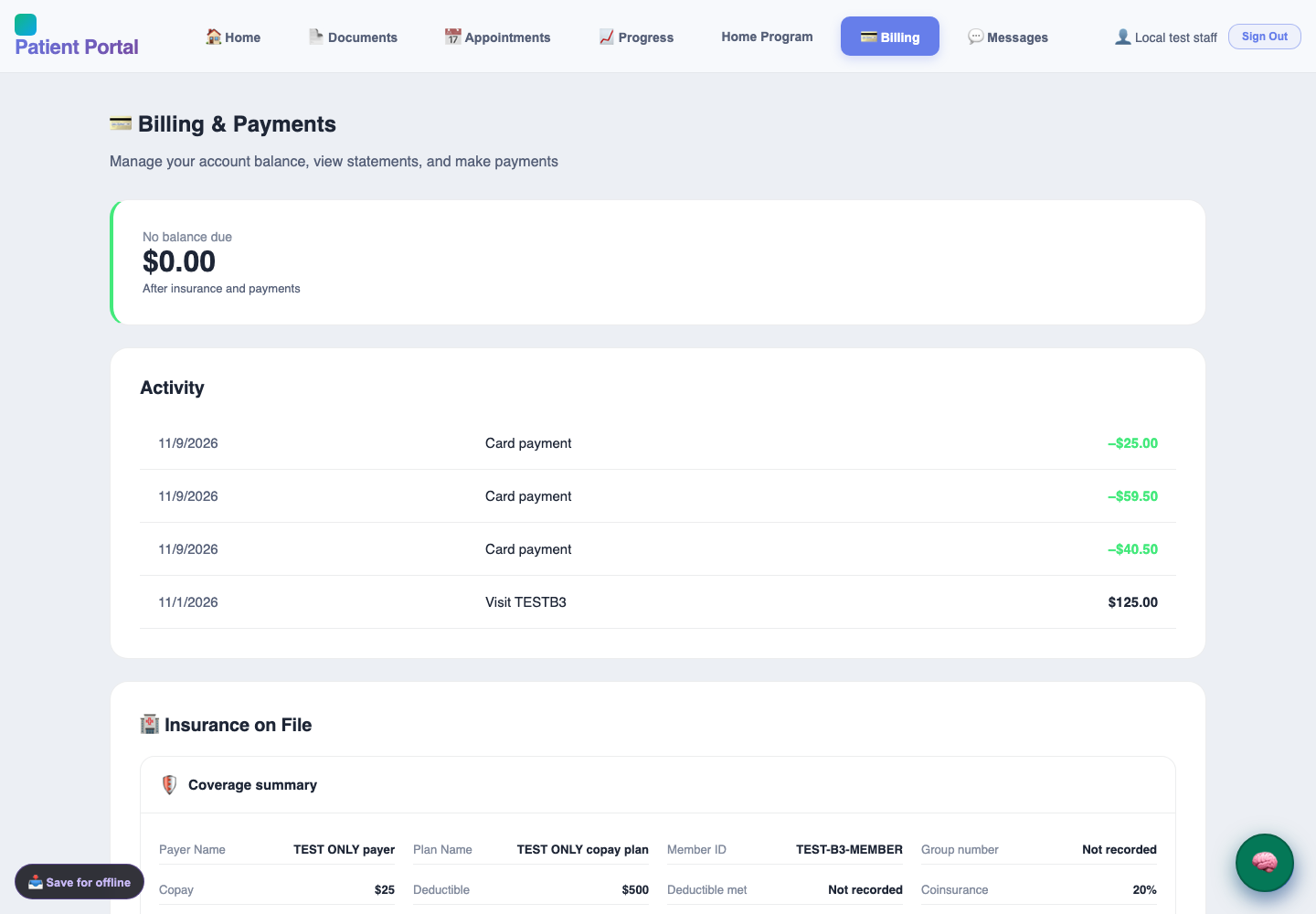
| Start a new $40.50 payment and complete it | $59.50 |
| Pay the remaining $59.50 | $0.00 |
Stripe confirmed three successful TEST payments and one expired, unpaid Checkout. The patient and staff views agreed on the final balance, with one credit for each successful payment.
For portrait and landscape examples, see patient payment choices.
What this preview covers
The tested scope includes saved insurance display, service pricing applied to appointments, patient copay/full/custom payments, unpaid cancellation and retry, and matching patient/staff balances. Invoice signing and delivery, automated payment emails, and live bank payouts are outside this preview. Do not treat a payment record as proof that an invoice or email was delivered.
Your practice remains responsible for its prices, payer agreements, coverage decisions, refunds, and financial reconciliation. Confirm the intended patient and workspace before recording or reviewing a transaction.